
The assumption I started with,
and why I threw it out
The original brief was straightforward: make invisible TBI recovery progress visible. The first version I designed was a dashboard.
It was, by most measures, good work. It was also completely wrong for the person who would actually use it.
The shift happened when I stopped asking “how do I display this information?” and started asking “who opens this app, and what state are they in when they do?”
The real user wasn’t
who the brief assumed
The original Synapse concept was patient-facing. But in early conceptual research, a different user kept surfacing: the caregiver. The spouse who sat in the neurology appointment and didn’t understand half of what was said. The adult child logging symptoms at 11pm, alone, not sure if today’s setback was normal or a sign of something worse. The person who is also, quietly, grieving the version of their loved one that existed before the injury.
Caregivers are the hidden labor force of TBI recovery. They’re present at every appointment, every discharge, every bad day. They’re making consequential decisions with incomplete information. And they’re doing it while running on five hours of sleep and a fear they can’t quite name.
A dashboard doesn’t help that person. A dashboard says: here is all your information, good luck navigating it. What that person needs is something closer to a hand on the shoulder. A voice that says: here’s the one thing that matters right now.
Four screens.
Four jobs. Nothing extra.
The structure itself communicates the philosophy. The app is not a library of information, it is a guide.
The visuals that
earned their place
The design process included an explicit audit: the stats strip was removed. Gamification on top of grief is a design failure. Everything that remained had to do emotional work or reveal meaning invisible to the naked eye.
Caregiver: data entry point.
The insight acknowledges their consistency before naming the pattern.
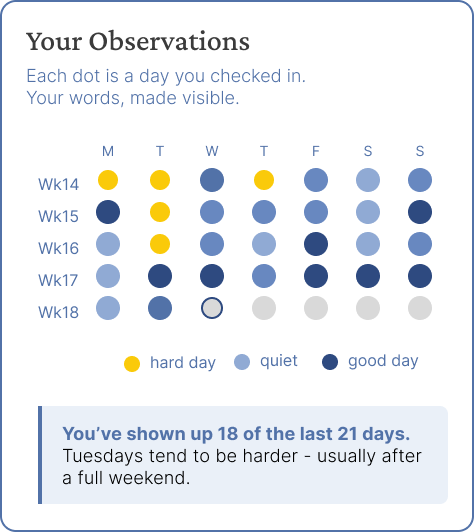
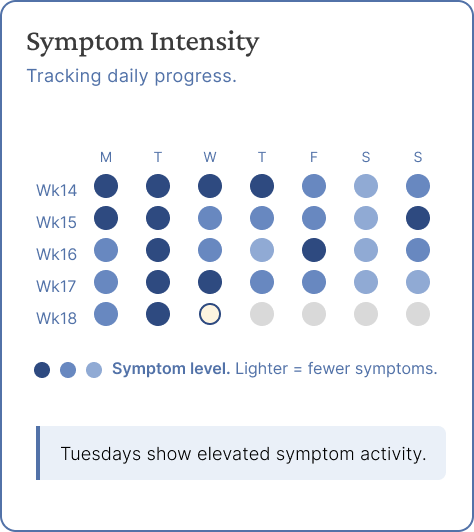
Symptom dot calendar: clinician framing vs. caregiver framing
The translator: the feature
that defines the product
Caregivers are excluded from understanding their loved one’s care. Not because doctors are unkind, but because the language of medicine was never designed for them. “Mild improvement in executive function, continued post-traumatic amnesia.” Dr. Park said it. Jamie wrote it down. Jamie has no idea what it means for tomorrow morning.
The voice matters as much as the accuracy. The translator explains notes in natural language, says what they mean for tomorrow, and sends the caregiver back into the next appointment with better questions. That’s a different product category than a medical dictionary.
Designing for emotional states,
not tasks
I’ve been thinking about the difference between designing for a task and designing for a state. Most product work is task-oriented. The user wants to accomplish X. We reduce friction.
Caregivers in acute situations aren’t in a task-completion state. They’re in a cognitive and emotional state that affects how they process information and how much decision-making energy they have.
The 01 moment,
reframed
The original case study framed Synapse’s zero-to-one leap as giving patients a way to say “I can see I’m getting better.” That’s still true. But the deeper 0→1 insight came later, in the design process.
The caregiver has never had an app that talked to them.
Every health app for TBI puts the patient at the center. Charts track the patient’s cognition. Feeds report the patient’s symptoms. The caregiver is a secondary actor: a data entry point, an alert recipient, a viewer.
Synapse treats the caregiver as the primary user. Their observations are the data. Their comprehension is the goal. Their emotional state is a design constraint. Their consistency, checking in 18 of 21 days, is acknowledged and named.
That shift doesn’t just change the interface. It changes the category. Synapse isn’t a health tracker with a caregiver mode. It’s a caregiver companion that also tracks health. That’s the new category. That’s the contrarian bet.